Devtools
@beignet/devtools gives local apps a live timeline for Beignet activity: requests, errors, use cases, domain events, jobs, outbox delivery, schedules, payments, feature flags, entitlements, policies, and provider activity.
bun add @beignet/devtoolsSetup
1. Register the provider
import { createDevtoolsProvider } from "@beignet/devtools";
import { createNextServer, createNextServerLoader } from "@beignet/next";

export const getServer = createNextServerLoader(() =>
  createNextServer({
    ports,
    providers: [createDevtoolsProvider(), ...otherProviders],
    context: async ({ ports, requestId, trace }) => ({
      requestId,
      ...trace,
      ports,
    }),
  }),
);
The provider is the only wiring devtools needs. The server itself owns request
instrumentation: createServer(...) resolves a request ID and W3C trace
context for every request, writes the x-request-id and traceparent
response headers, and records request and error events into the resolved
provider instrumentation port. Requests under /api/devtools are ignored by
default so dashboard traffic does not pollute the timeline. See
request lifecycle for the instrumentation option that
configures headers, ignored paths, redaction, and capture decisions.
Devtools does not require the OpenTelemetry SDK, but events are shaped for
OTel-compatible correlation with traceId, spanId, parentSpanId, and
traceparent from @beignet/core/tracing. Install the
OpenTelemetry provider when the app should export active
spans and production metrics while retaining this local timeline. Spread the
trace context argument into your app context so deeper instrumentation stays
on the same trace.
2. Add the dashboard route
// app/api/devtools/[[...path]]/route.ts
import { createDevtoolsRoute } from "@beignet/devtools";
import { getServer } from "@/server";

export const { GET, POST } = createDevtoolsRoute(
  async () => (await getServer()).ports.devtools,
  {
    basePath: "/api/devtools",
    authorize: async (req) =>
      Boolean(await (await getServer()).ports.auth.getSession(req)),
  },
);
Sign in, then visit /api/devtools in development.
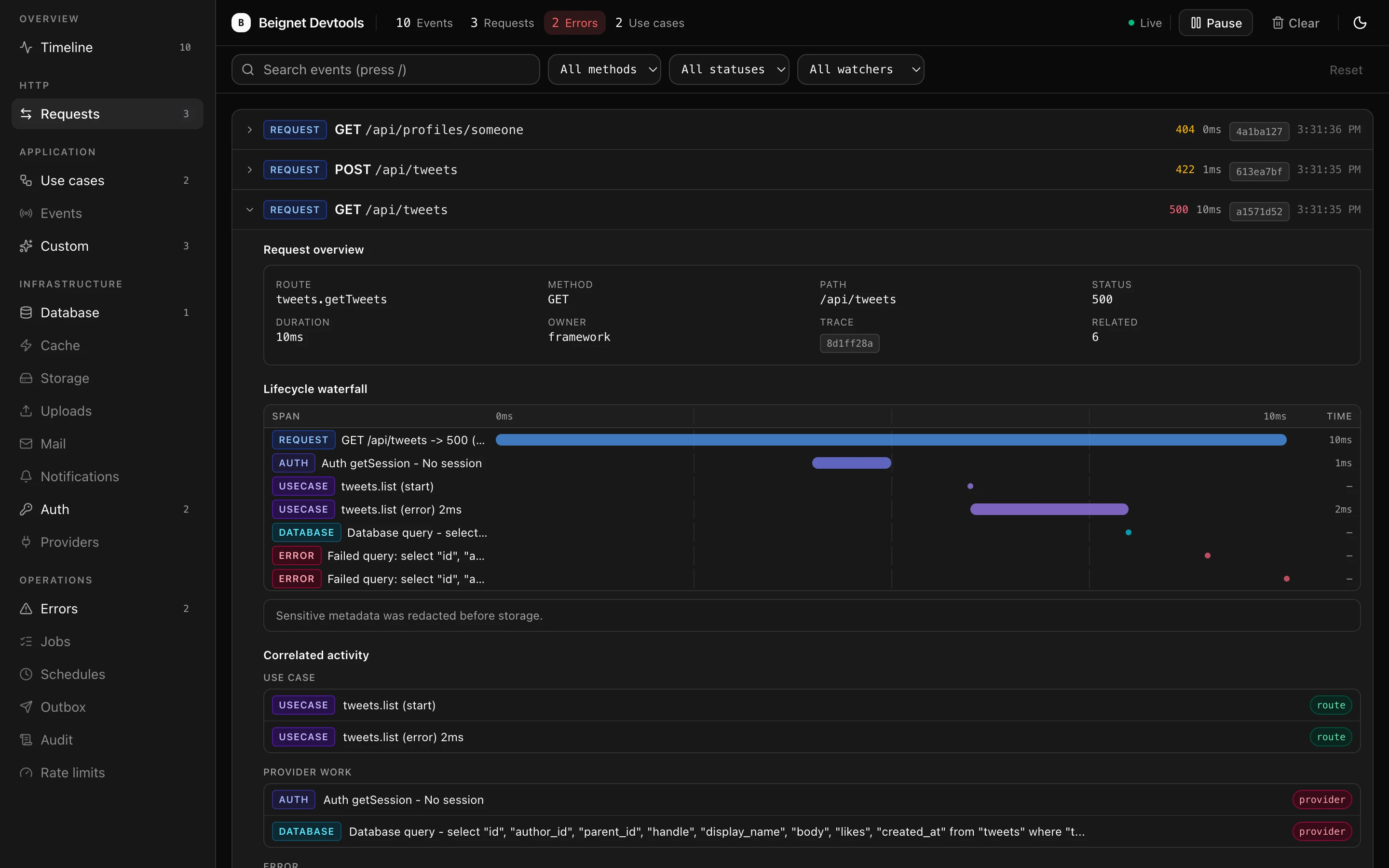
The dashboard streams live events over Server-Sent Events, groups views by
section in the sidebar, and supports search (/), method/status/watcher
filters, Pause/Resume, and Clear. Request rows expand into an end-to-end
lifecycle view for events sharing the same traceId or requestId: a
waterfall of correlated spans, overview facts, correlated activity grouped by
category, and the raw JSON. Request spans break down into per-stage sub-bars
— onRequest hooks, parsing, context creation, beforeHandle hooks, the
handler, and send — so a request that "feels slow" shows where the time
went; a wide context bar on every request usually means sequential remote
lookups in the context factory (see
Context latency budgets).
Start there when debugging a route. The errors
view groups failures by owner — route, framework, provider, job, schedule,
outbox, client-side, devtools, or unknown — and each subsystem view shows
domain-specific metrics such as cache hits/misses, outbox attempts, or rate
limit decisions. The payments view focuses on checkout sessions, portal
sessions, refunds, verified webhooks, provider IDs, and failures. The
entitlements view focuses on paid product access decisions, subjects, denial
reasons, and check sources. The policies view focuses on observed
authorization decisions, abilities, denial reasons, and batch sources.
The stream sends a fresh snapshot on connection, uses heartbeat comments to
reduce idle disconnects through intermediaries, and closes after four minutes
so EventSource reconnects and receives a fresh bounded snapshot. When the host
reports a disconnect through request abort or response cancellation, the
stream releases its server subscription; timed closure does the same. Unread
encoded stream data is capped at 1 MiB; exceeding the limit closes the
connection so EventSource can reconnect instead of retaining an unbounded
server queue. Initial snapshots retain the newest events that fit within the
same cap as a contiguous newest-first window and stop when the next entry
cannot fit. The dashboard displays omittedEvents and omittedWatchers in a
partial-snapshot warning when entries are left out, so an oversized stored
event cannot trap the dashboard in a reconnect loop or repeatedly force the
server to inspect the remaining buffer.
3. Optional local persistence
The default buffer is in memory. Enable local persistence when you want the timeline to survive dev server restarts:
import {
  createDevtoolsProvider,
  createFileDevtoolsStore,
} from "@beignet/devtools";

createDevtoolsProvider({
  store: createFileDevtoolsStore({
    filePath: ".beignet/devtools/core/events.jsonl",
  }),
});
You can also enable the built-in file store with environment variables:
DEVTOOLS_PERSIST=true
DEVTOOLS_PERSIST_PATH=.beignet/devtools/core/events.jsonl
The file store writes JSONL and compacts to the most recent configured events.
POST /api/devtools/clear clears the in-memory buffer and the configured store.
4. Configure watchers
Watchers own capture for each subsystem. Configure them through
createDevtoolsProvider(...):
createDevtoolsProvider({
  watchers: {
    requests: true,
    errors: true,
    useCases: true,
    eventBus: false,
    jobs: false,
    outbox: true,
    schedules: true,
    providers: true,
    db: true,
    cache: true,
    payments: true,
    entitlements: true,
    custom: true,
  },
});
Disabled watchers do not store matching events. The built-in watchers are
requests, errors, useCases, eventBus, jobs, outbox, schedules, providers, db,
cache, storage, uploads, mail, payments, flags, entitlements, notifications, auth, audit, policies, rateLimit, and
custom.
Custom integrations can register watcher metadata too. Custom watcher views
appear in the dashboard sidebar when they own custom events:
createDevtoolsProvider({
  watchers: {
    search: {
      label: "Search",
      description: "Search query and indexing diagnostics.",
      eventTypes: ["custom"],
    },
  },
});
Then record events with watcher: "search" so that custom watcher controls
whether they are stored.
5. Use cases are instrumented automatically
createUseCase(...) instruments every run by default. No devtools-specific
wiring is needed:
import { createUseCase } from "@beignet/core/application";

export const useCase = createUseCase<AppContext>();
Each run resolves the instrumentation port from ctx.ports, reads
ctx.requestId and trace context fields, and records usecase events that
share one nested span across start, end, and error phases. Failed runs
also record correlated error events. Without an installed sink, runs stay
silent. Pass instrumentation: false to opt out.
Provider instrumentation
Providers record external work through createProviderInstrumentation() from
@beignet/core/providers instead of depending on devtools directly;
@beignet/devtools implements the instrumentation port that helper resolves.
When provider instrumentation records an event during an active request,
devtools fills in the active requestId, traceId, and traceparent so
provider work stays correlated with the route, hook, and use-case timeline.
See Writing a provider for the instrumentation
conventions, resolution order, and watcher guidance.
Audit activity
Durable audit logs should still be written through your app's AuditLogPort.
Use createInstrumentedAuditLog() from @beignet/core/ports when local
debugging should also show sanitized audit activity:
import { createInstrumentedAuditLog } from "@beignet/core/ports";

const audit = createInstrumentedAuditLog({
  audit: durableAudit,
  instrumentation: ports,
});
The wrapper records the durable audit entry first, then emits a custom event
owned by the audit watcher into the resolved instrumentation port. Devtools
remains a local diagnostic view; it is not the durable audit store.
When an audit port is transaction-scoped, emit the devtools mirror only after the transaction commits. Keeping the transaction-scoped audit port durable-only is preferable to showing a local audit event for work that later rolls back.
Manual events
Use record() when application code wants to add a custom event. It fills id and timestamp for you.
ctx.ports.devtools.record({
  type: "custom",
  watcher: "search",
  name: "search.query",
  label: "Search query",
  summary: "24 results in 18ms",
  details: {
    queryLength: query.length,
    resultCount: 24,
    durationMs: 18,
  },
});
Use log() only when you already have a complete DevtoolsEvent.
Redaction
Devtools uses the shared redaction helpers from @beignet/core/ports before events are stored. Sensitive keys such as authorization, proxy-authorization, cookie, set-cookie, x-api-key, accessKey, jwt, session, token, password, secret, and credentials are replaced with [redacted]. High-confidence credential shapes embedded in strings—including Bearer and Basic credentials, JWTs, credential-bearing URLs, secret assignments, and private keys—are scrubbed too, including in error messages and stacks.
Server request instrumentation records request headers for debugging, but it does not record request or response bodies by default. The request lifecycle view marks stored events when sensitive fields were redacted and warns if secret-shaped metadata keys remain visible.
Add an app-owned redactor through the server instrumentation option:
const server = await createNextServer({
  // ...
  instrumentation: {
    redact: (event) => ({
      ...event,
      details: scrub(event.details),
    }),
  },
});
Event types
| Type | Description | Key fields |
|---|---|---|
request | HTTP request handling | method, path, status, durationMs, stages, responseOwner |
error | Errors | message, stack, contractName, useCaseName, owner |
usecase | Use case execution | name, kind, phase, durationMs |
eventBus | Domain event publishing | eventName |
job | Background job lifecycle | jobName, status |
schedule | Schedule execution | scheduleName, status, cron, timezone |
provider | Provider lifecycle | providerName, action |
custom | App-specific diagnostics | name, label, summary, details |
All events share id, timestamp, an optional requestId, optional
traceId, optional spanId, optional parentSpanId, optional traceparent,
and an optional watcher for custom watcher ownership.
Endpoints
| Endpoint | Description |
|---|---|
GET /api/devtools | Dashboard UI |
GET /api/devtools/core/events | JSON event list |
GET /api/devtools/stream | Server-Sent Events stream with a fresh snapshot on each connection |
POST /api/devtools/clear | Clear the in-memory buffer and configured store |
The events endpoint accepts type, requestId, traceId, and limit query
parameters.
Configuration
The provider controls whether events are recorded. The HTTP route controls whether those events are exposed. HTTP routes auto-enable only in development.
DEVTOOLS_ENABLED=true
DEVTOOLS_ENABLED=false
DEVTOOLS_MAX_EVENTS=1000
DEVTOOLS_PERSIST=true
DEVTOOLS_PERSIST_PATH=.beignet/devtools/core/events.jsonl
The default in-memory buffer keeps the latest 500 events. The events endpoint returns the latest 200 unless a limit query parameter is provided. Persistence is opt-in and uses .beignet/devtools/core/events.jsonl by default when enabled without a custom path.
Route handlers auto-enable only when NODE_ENV === "development", and they
remain hidden until you configure an access policy. Generated apps wire
DEVTOOLS_ENABLED through lib/env.ts and authorize signed-in sessions through
the auth port. Set DEVTOOLS_ENABLED=false to disable the route locally.
Unset, test, preview, staging, and production environments also require
DEVTOOLS_ENABLED=true before authorization can expose the route. The
starter's sidebar reads the same value for local navigation.
Browser requests that include an Origin header must be same-origin, even when
authorize succeeds. This is a browser safeguard in addition to application
authorization.
For staging or internal production diagnostics, add application-owned authorization:
import { createDevtoolsRoute } from "@beignet/devtools";
import { getServer } from "@/server";

export const { GET, POST } = createDevtoolsRoute(
  async () => (await getServer()).ports.devtools,
  {
    basePath: "/api/devtools",
    enabled: process.env.DEVTOOLS_ENABLED === "true",
    authorize: async (req: Request) => {
      const session = await (await getServer()).ports.auth.getSession(req);
      return session?.user.id === process.env.DEVTOOLS_ADMIN_USER_ID;
    },
  },
);
If authorize returns false, devtools responds with 404. If it returns a
Response, that response is used.
If your development server binds exclusively to loopback, you can opt into an
unauthenticated local route with
allowUnauthenticatedDevelopmentAccess: true. The option works only in
development and only for loopback URL hostnames. Do not use it with 0.0.0.0,
a LAN or container-accessible interface, or a hosted development environment:
the Fetch Request URL describes the destination, not the network peer.
Use cookie/session authorization for the embedded dashboard. Same-origin
dashboard requests include cookies, while browser EventSource requests
cannot attach an application-defined authorization header.
Broadcast activity
The broadcast watcher receives provider and endpoint activity: publications,
subscription lifecycle, readiness, denials, temporary failures, and broker
continuity loss. Browser reconnection status is available through client
onStatusChange callbacks. Broadcast-specific records omit payloads, channel
parameters, and origin IDs; shared redaction also hides the optional origin
header and captured broadcastOrigin/excludeOrigin fields. See
Broadcasting for delivery semantics and recovery.